How to Reset Nissan Pathfinder Service Light: Step-by-Step Guide
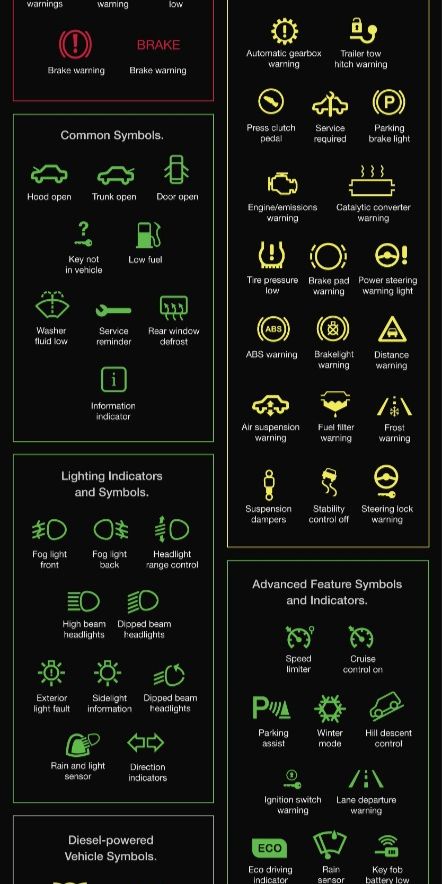
Resetting the service light on your Nissan Pathfinder is a straightforward process that empowers vehicle owners to maintain their car's operational transparency. This dashboard indicator serves as a reminder for scheduled maintenance, and while it is a vital component of the vehicle's system, it can sometimes activate prematurely or after the service has been completed by a third party. Understanding how to manually reset this light ensures that you retain full control over your vehicle's maintenance schedule and confirmation status.
Understanding the Service Maintenance Light
The service light on your Nissan Pathfinder is not a warning of immediate danger, but rather a proactive notification system. It is typically triggered by an internal algorithm that monitors driving habits, engine runtime, and mileage to determine when routine maintenance is due. This maintenance schedule is designed to keep the vehicle running at peak efficiency by prompting timely oil changes, filter replacements, and system checks. Resetting the light is the final step in acknowledging that the required service has been performed.
Preparation and Safety Precautions
Before interacting with the vehicle's electrical systems, it is essential to take specific precautions to ensure safety and prevent accidental damage. The procedure requires the ignition to be cycled multiple times, which can cause components to activate unexpectedly if the vehicle is in gear. Ensuring the vehicle is securely parked and the parking brake is engaged eliminates the risk of movement. Additionally, having the correct tools ready, specifically the vehicle's ignition key or a compatible scan tool, streamlines the process efficiently.


Method 1: The Ignition Cycle Method (Standard Approach)
This method relies on the vehicle's internal computer sequence and is effective for most models year-round. It involves a specific pattern of turning the ignition on and off without starting the engine. This action sends a reset signal to the vehicle's computer to acknowledge the maintenance has been completed. Follow these steps carefully to ensure the light is cleared successfully on the first attempt.
Step-by-Step Instructions
- Ensure the transmission is in Park (P) and the parking brake is firmly engaged.
- Insert the key into the ignition switch and turn it to the "ON" position. You should observe all dashboard warning lights illuminate for a few seconds.
- After the lights appear, turn the key back to the "OFF" position. Wait approximately 5 seconds.
- Repeat the process of turning the key to "ON" and then back to "OFF" a total of three times.
- On the fourth time turning the key to the "ON" position, do not turn it off. Instead, hold the key in the "ON" position for approximately 10 to 15 seconds.
- Observe the service light; it should begin to blink. After it blinks, turn the key to the "OFF" position.
- Start the engine to confirm that the service light has been reset and is no longer displayed on the dashboard.
Method 2: Using the Trip Meter (Alternative Approach)
For drivers who find the ignition cycle method difficult to time or for models with specific computer configurations, the trip meter reset offers a reliable alternative. This method utilizes the steering wheel buttons to navigate the vehicle's information display and manually instruct the system to reset the maintenance counter. This approach is often more intuitive as it provides visual feedback on the dashboard screen.


Step-by-Step Instructions
- Turn the ignition key to the "ON" position without starting the engine, ensuring the driver's seat belt is fastened if required.
- Locate the odometer/trip button on the steering column, usually found on the turn signal lever.
- Press and hold the "TRIP RESET" or odometer button. While holding this button, use the toggle switch to turn the ignition to "ON."
- Continue holding the button for about 10 seconds until the service indicator on the display begins to blink.
- Release the button. The system may prompt you to confirm the reset; if so, press the button again.
- Turn the ignition off and then back on to verify the reset was successful.
Utilizing an OBD-II Scanner for Advanced Users
Modern Nissan Pathfinders are equipped with sophisticated computer systems that can be interfaced directly using an On-Board Diagnostics (OBD-II) scanner. This method provides the most direct route to resetting the service light, as it allows you to access the service menu within the vehicle's computer. This approach is highly recommended for individuals who perform their own diagnostics or require confirmation that the reset was executed correctly at the module level.
Step-by-Step Instructions
- Plug the OBD-II scanner into the diagnostic port located under the dashboard near the steering column.
- Turn the ignition to the "ON" position without starting the engine to power the scanner.
- Follow the on-screen prompts of the scanner to navigate to the main menu.
- Select the "Vehicle Information" or "Diagnostics" tab, then locate the "Service Reset" or "Maintenance Reset" option.
- Confirm your selection when prompted. The scanner will communicate with the vehicle's Engine Control Unit (ECU).
- Once the scanner confirms the reset is complete, power off the scanner and remove it from the port.
- Check the dashboard to ensure the service light has been cleared.
Troubleshooting Common Reset Issues
Occasionally, the service light may persist or behave unexpectedly after attempting a reset. This situation usually indicates that the reset process was not completed correctly or that the vehicle requires a specific sequence. If the light remains on after trying the ignition method, it is possible that the vehicle is still waiting for a confirmation signal that was not delivered properly. Switching to the trip meter method often resolves this issue, as it interacts with the vehicle differently.
When to Seek Professional Assistance
While resetting the service light is generally a simple task, there are scenarios where professional intervention is necessary. If the light fails to reset after multiple attempts using different methods, it could indicate a malfunctioning sensor or a deeper issue with the vehicle's computer system. Furthermore, if the light turns off but immediately illuminates again upon starting the engine, this suggests that the underlying maintenance condition has not actually been resolved. In these instances, visiting a certified Nissan dealership is the most prudent course of action to diagnose the root cause.


Related Articles

Reset Nissan Pathfinder Oil Light: Easy Step-by-Step Guide
For the Nissan Pathfinder owner, deciphering the oil light is a critical aspect of vehicle ownership. This warning indicator is not merely a suggestion; it is...

Reset Oil Light Nissan Pathfinder: Quick Fix Guide
Encountering the oil pressure warning light on your Nissan Pathfinder can be a stressful experience for any driver. This indicator, often depicted as an oil...

How to Turn On Headboard Light: Easy Step-by-Step Guide
Illuminating Your Space: A Step-by-Step Guide to Turning On Your Headboard Light In today's modern homes, headboards aren't just about support and style...

Fix a Plasterboard Ceiling: Step-by-Step Guide to Repairing Light Fixtures
Noticing a sagging ceiling or a persistent crack in your plasterboard ceiling is more than just an eyesore; it is a structural warning sign that demands...

Effortless Drywall Recessed Light Removal: A Step-by-Step Guide
How to Cut Out Recessed Lights in Drywall: A Comprehensive Guide Installing recessed lights in your home can significantly enhance its ambiance and...

Reset Samsung Side-by-Side Refrigerator: Easy Step-by-Step Guide
Resetting Your Samsung Side-by-Side Refrigerator: A Step-by-Step Guide Is your Samsung side-by-side refrigerator acting up? Before you call for service, try...